BoltGATE 20-25
Document Revision History
| Revision | Date | Notes |
|---|---|---|
| 0.1 | 01/06/2023 | First draft |
| 0.2 | 14/06/2023 | Second draft |
| 1.0 | 21/06/2023 | Initial release |
| 1.1 | 19/07/2023 | Added "run the demo", fixed typos |
| 1.2 | 19/06/2026 | Tests and documentation updates to match AWS template |
Overview
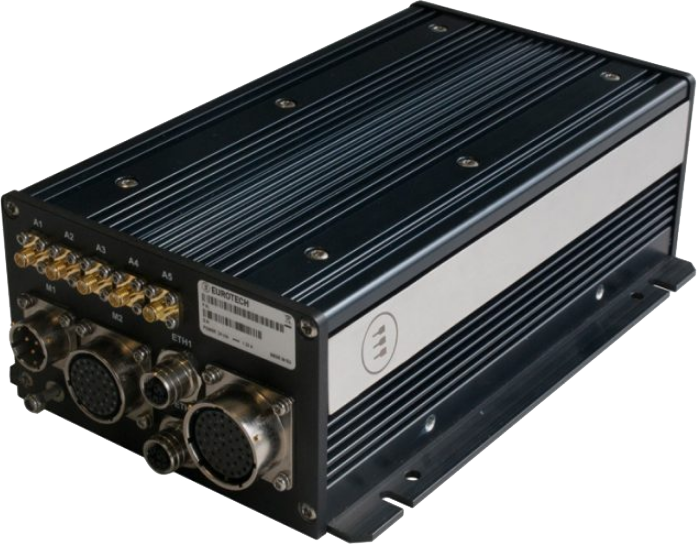
The BoltGATE 20-25 is a Multi-service IoT Edge Gateway, EN 50155 certified, and designed to exceed the requirements of rolling stock in the TX temperature class. With IP64 rating, it is extremely rugged and suitable for any application where consistent performance and reliability are a must.
Based on the Intel Atom x5-E3940 processor family, with up to 8GB of RAM, 16GB of eMMC and 64GB mSATA, the BoltGATE 20-25 offers extra storage expansions through optional internal or removable 2.5” SATA SSD/HDD, mSATA, and a user-accessible microSD slot.
At 30W max, the BoltGATE 20-25 is a fanless, compact unit that provides a large number of communication and I/O interfaces: two 100Mbps Ethernet, protected USB 2.0, four isolated serial interfaces, eight isolated DI/O plus odometer and key signals, CAN bus, video, and optional MVB. It also features a wide range of connectivity capabilities including one LTE cellular modem, Wi-Fi, Bluetooth Low Energy, and a dedicated internal GNSS with Untethered Dead Reckoning.
As a result of its modular design, the BoltGATE 20-25 can easily be customized for the requirements of the target application. With three full miniPCIe slots, it can accommodate additional connectivity or communication options and, through Eurotech Professional Services, it can offer custom front panel configuration and connectors or customized software images.
The BoltGATE 20-25 helps system integrators accelerating their projects and managing fleets of devices throughout the entire lifecycle:
- Hardware developers can leverage on a platform that is feature rich, with a wide range of radio and wired interfaces, deeply certified and fully hardened against physical cyber-attacks.
- Application developers can accelerate dramatically the creation of their applications by leveraging the APIs and services provided by Everyware Software Framework (ESF), Eurotech’s Java/OSGi middleware for IoT Edge Gateways. ESF supports ready-to-use field protocols (including Modbus, OPC-UA, S7), MQTT connectivity, and web-based visual data flow programming.
- Cloud developers benefit from native connectors to Eurotech Everyware Cloud, AWS and other third-party Cloud services.
The BoltGATE 20-25 is AWS IoT Core Qualified and can be integrated with 3rd party cloud services.
NOTE: The BoltGATE 20-25 is also available in the MVB Edition. For more information see BoltGATE 20-25 MVB Edition
Hardware Description
Datasheet
Standard Kit Contents
Depending on the order code, you will receive the BoltGATE 20-25 ready to be powered on with no additional hardware. If you ordered a DevKit with ESF, you will also receive a Power Supply for your region, antennas for WiFi and Cellular connectivity and a Ethernet Cat 5 cable. Visit the product page for info on ordering codes.
User provided items
A PC (Windows, Linux or Mac OS) with an Ethernet port and an Ethernet cable or, where applicable, Wi-Fi(TM) to connect to the device.
3rd Party purchasable items
If not included in the DevKit, an AC-DC Power adapter, 30W, EN 50155 class S2 for 24 V DC and 110 V DC Nominal Voltage Inputs is required.
Connector specifications:
- M1 Connector example: Manufacturer Souriau, Part Number 851-06RC12-03S5044
Custom Configuration
Eurotech configuration management service allows fine tuning the device to meet and exceed your project requirements; Examples of personalized configuration include customer branding (with logo and custom colors) and can go to deep customization with a range of options for project specific requirements (such as frame grabbers, choice of internal components, etc.): call us for more information on configuration management options.
Set up Your Development Environment
Operating System
Your BoltGATE 20-25 can run Eurotech Everyware Linux or Windows 10 IoT Enterprise according to product variants.
Tools Installation
The device is distributed with the latest version of ESF already installed and ready to start.
In order to develop and deploy applications on ESF, you can follow the dedicated guides on ESF official documentation - development environment setup.
If you need to build your native applications on this target hardware, please contact us to receive the latest toolchain.
If you need to build your containerized applications on this target hardware, please check the container orchestration guide
Additional References
Detailed documentation on the features provided by the available services running on the device can be found in the ESF official documentation.
Set up Your Hardware
Front Panel Overview
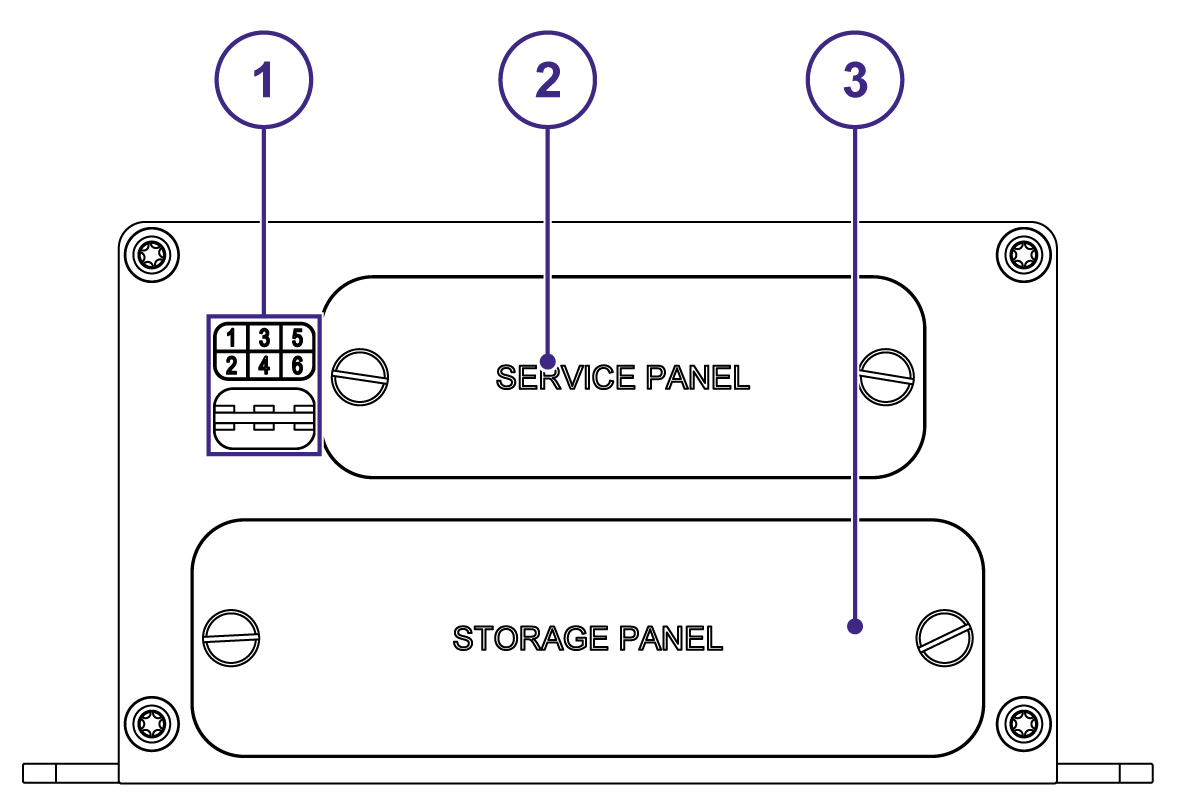
| Ref | Description |
|---|---|
| 1 | LED Indicators |
| 2 | Service Panel |
| 3 | Storage Panel |
LED indicators Overview
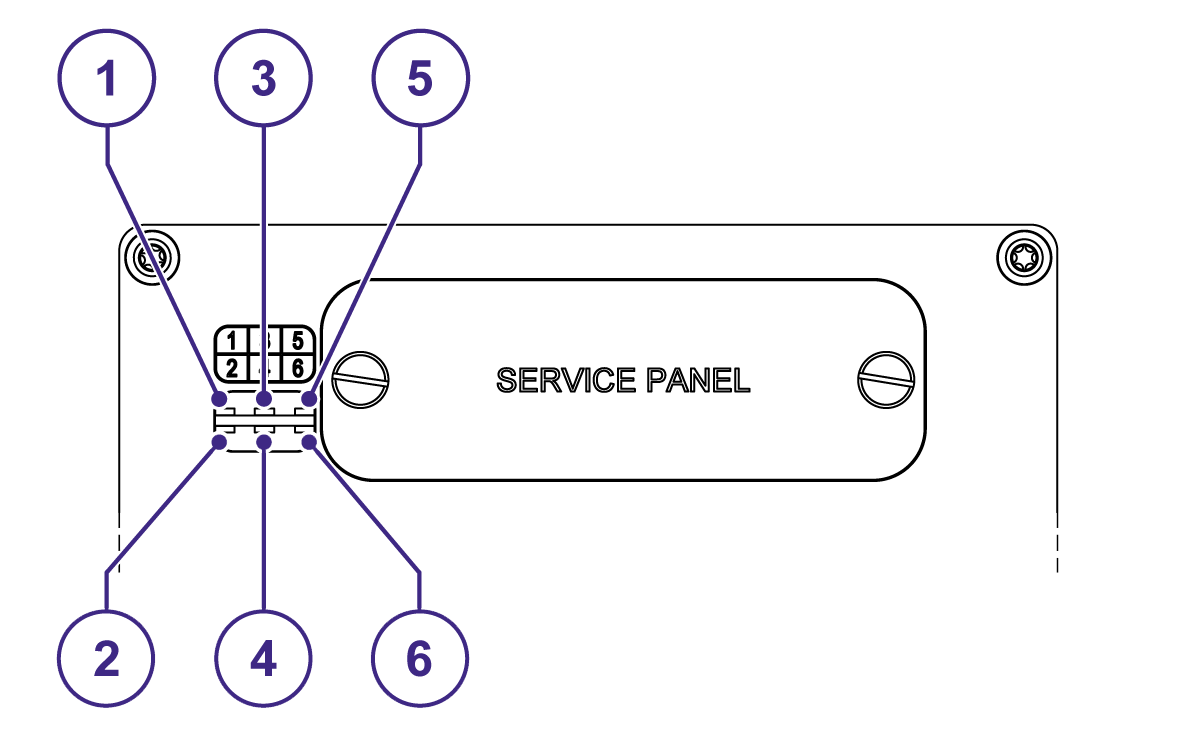
| Ref | Description | Color |
|---|---|---|
| 1 | USER 1 | Dual-color (green/amber) |
| 2 | MiniPCIe Slot #3 | Green |
| 3 | USER 2 | Dual-color (green/amber) |
| 4 | MiniPCIe Slot #2 | Green |
| 5 | Power status | Blue |
| 6 | MiniPCIe Slot #1 | Green |
Rear Panel Overview
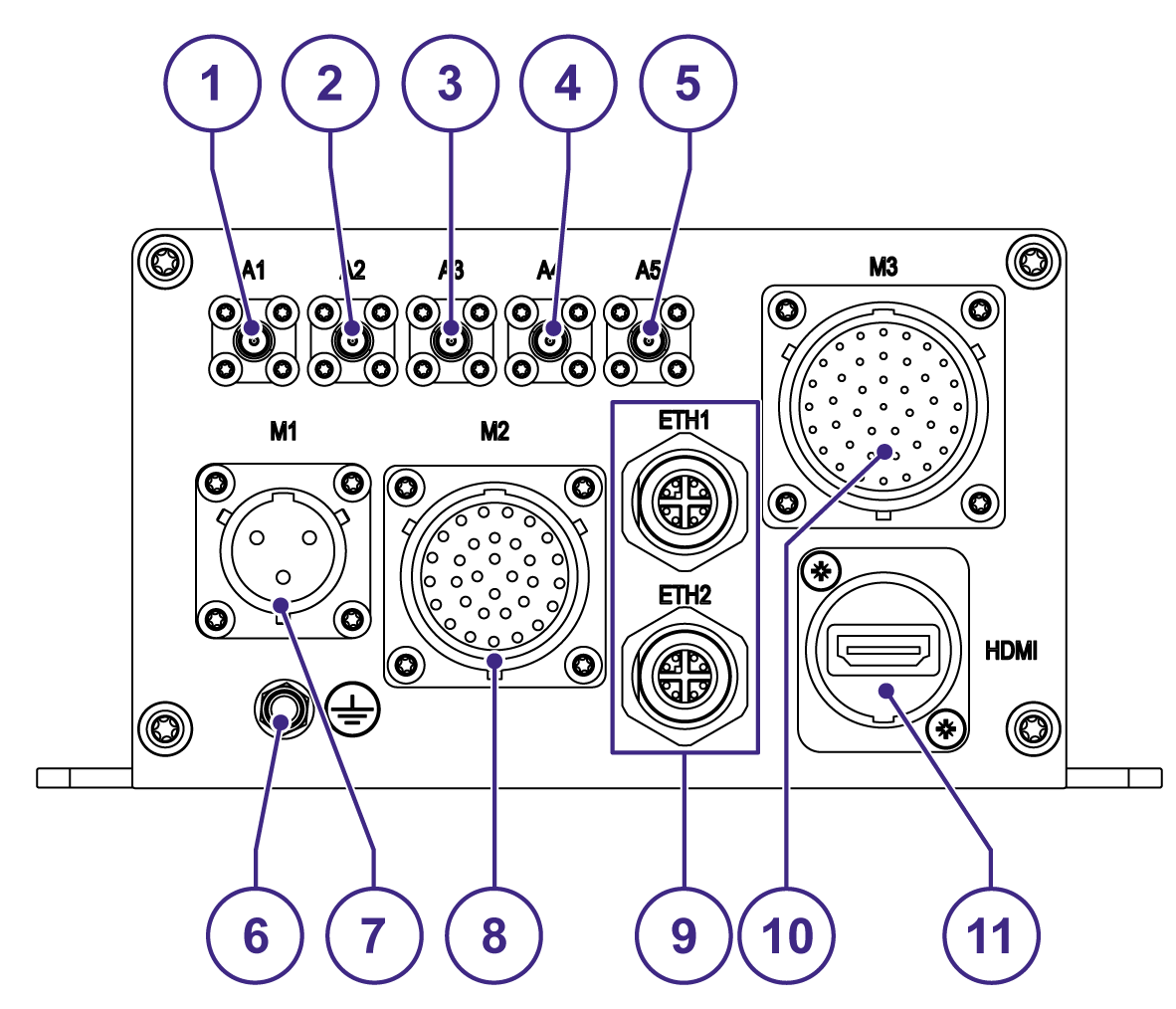
| Ref | Description |
|---|---|
| 1 | Wi-Fi and Bluetooth Co-existence Main Antenna Connector |
| 2 | Wi-Fi(MIMO) DiversityAntenna Connector |
| 3 | Cellular Main Antenna Connector (availability depends on product variant) |
| 4 | Cellular Diversity Antenna Connector (availability depends on product variant) |
| 5 | GNSS Antenna Connector |
| 6 | Earth Connection Terminal |
| 7 | Power IN Connector |
| 8 | 3x COM, 1x CAN, Audio Interfaces |
| 9 | 2x 10/100/1000 Mbps Ethernet Connectors (ETH 1 and ETH 2) |
| 10 | 1x COM, 1x CAN, 4x Digital I/Os, 2x USB Interfaces |
| 11 | HDMI Connector (availability depends on product variant) |
Setup Your AWS Account
Refer to the online AWS documentation at Set up your AWS Account. Follow the steps outlined in the sections below to create your account and a user and get started:
Pay special attention to the Notes.
Create Resources in AWS IoT
Refer to the online AWS documentation at Create AWS IoT Resources.
Follow the steps outlined in these sections to provision resources for your device:
Install the AWS CLI or use the CloudShell
To install the AWS CLI on your host machine, refer to the instructions at Installing the AWS CLI v2. Installing the CLI is needed to complete the instructions in this guide.
Once you have installed AWS CLI, configure it as per the instructions in this online guide. Set the appropriate values for Access key ID, Secret access key, and AWS Region. You can set Output format to "json" if you prefer.
Alternatively, you can use the AWS CloudShell to send the same AWS CLI commands directly from your browser.
AWS IoT Core Connection
This section provides a guide on connecting an ESF device to the Amazon Web Services (AWS) IoT platform. This guide covers the usage of the ESF Cloud Connector for AWS IoT Core and other integrations with AWS IoT services like AWS Greengrass.
Prerequisites
In order to connect a device to AWS IoT Core, the following prerequisites are needed:
- An AWS IoT account
- A device with ESF version 3.3 or greater installed
Provision the Device with credentials
AWS IoT Core supports three types of provisioning:
- Single Thing Provisioning
- Just In Time Provisioning (JITP)
- Bulk Provisioning
You can find detailed instructions on Single Thing Provisioning in the ESF documentation website. JITP, Just In Time Registration and Bulk Provisioning require custom setup, usually involving a discussion with one of our Solution Architects. Please feel free to contact us if you need to enable JITP, JITR or Zero-Touch Provisioning on your Eurotech device.
Connectors Available
Two alternative ways can be used to connect to AWS IoT Core from ESF:
- Using the ESF Cloud Connector for AWS IoT Core (Requires ESF 6.1.0+)
- Configuring the Generic ESF MQTT Connector (Requires ESF 3.3.0+)
Both ESF Connectors support all three provisioning techniques.
Completing device provisioning is a prerequisite before an IoT device can successfully connect to AWS IoT Core.
Running the demo
ESF Wires can be leveraged to create a simple demo flow to test the connection to AWS IoT Core.
- Open the ESF Web Console on your device, by accessing ESF from your browser.
- Login with your credentials (default credentials can be found in the ESF documentation)
- Navigate to the Cloud Connections section of ESF
Once your Eurotech device is connected to IoT Core, the relevant ESF Cloud Connector will look as follows: 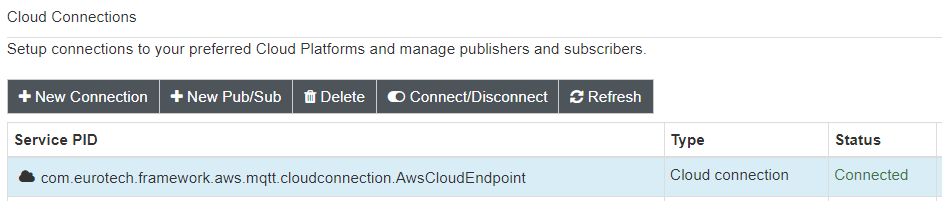
- Click on "New Pub/Sub" and select a new AwsThingPublisher from the list. Assign it a name (e.g. demo.publisher)
A new Thing Publisher will be associated to this Cloud Connection. Select the newly created publisher and configure it with a unique topic (e.g. demo.topic) 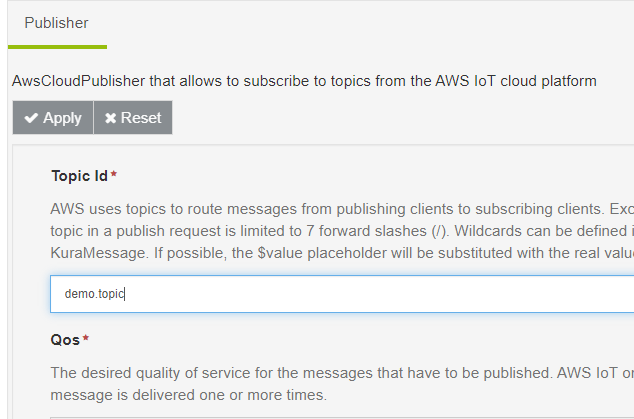
- Navigate to the Wires section
- Add to the Canvas a Timer component and a Publisher component
- Link the components together
- Configure the Publisher component to link to the previously created AWSThingPublisher
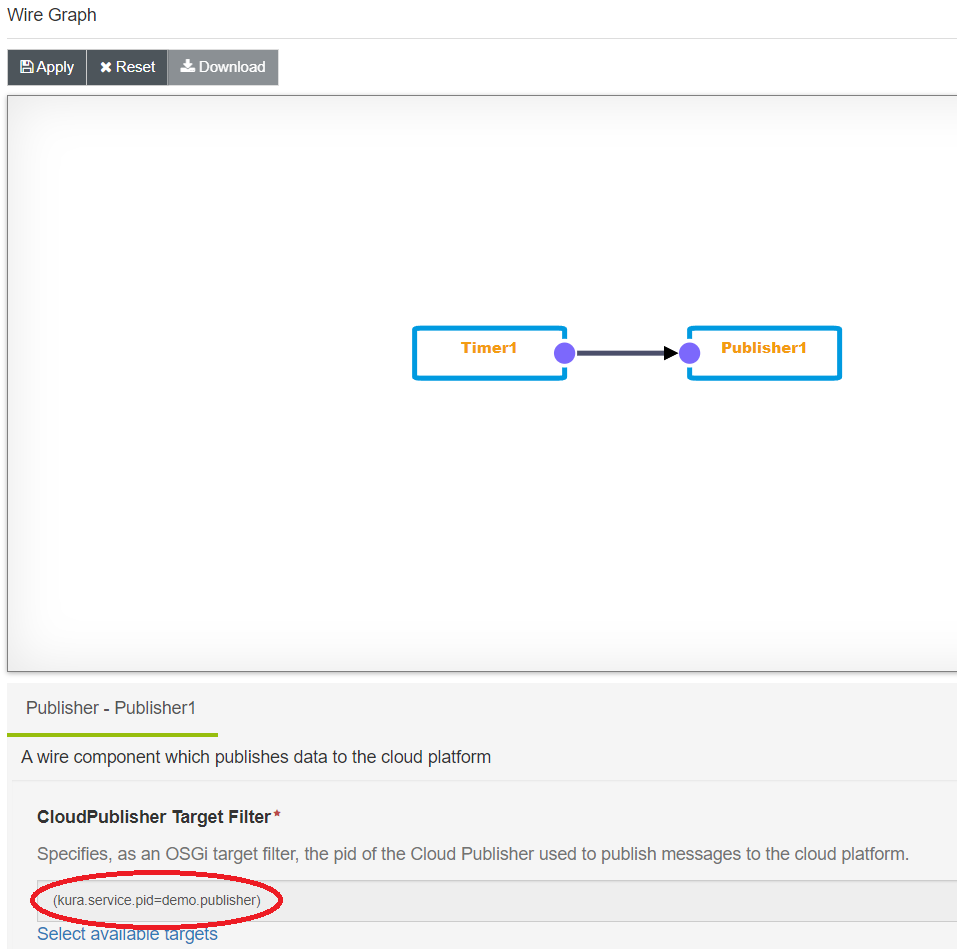
- Apply the changes
Verify messages in AWS IoT Core
AWS IoT Core will receive periodic timer events directly from the ESF Wire Graph.
- Go to IoT Core in the AWS Console
- Activate the MQTT test client
- subscribe to the topic configured in the AWSThingPublisher (e.g. demo.topic)
AWS IoT Core will receive periodic timer events directly from the ESF Wire Graph.
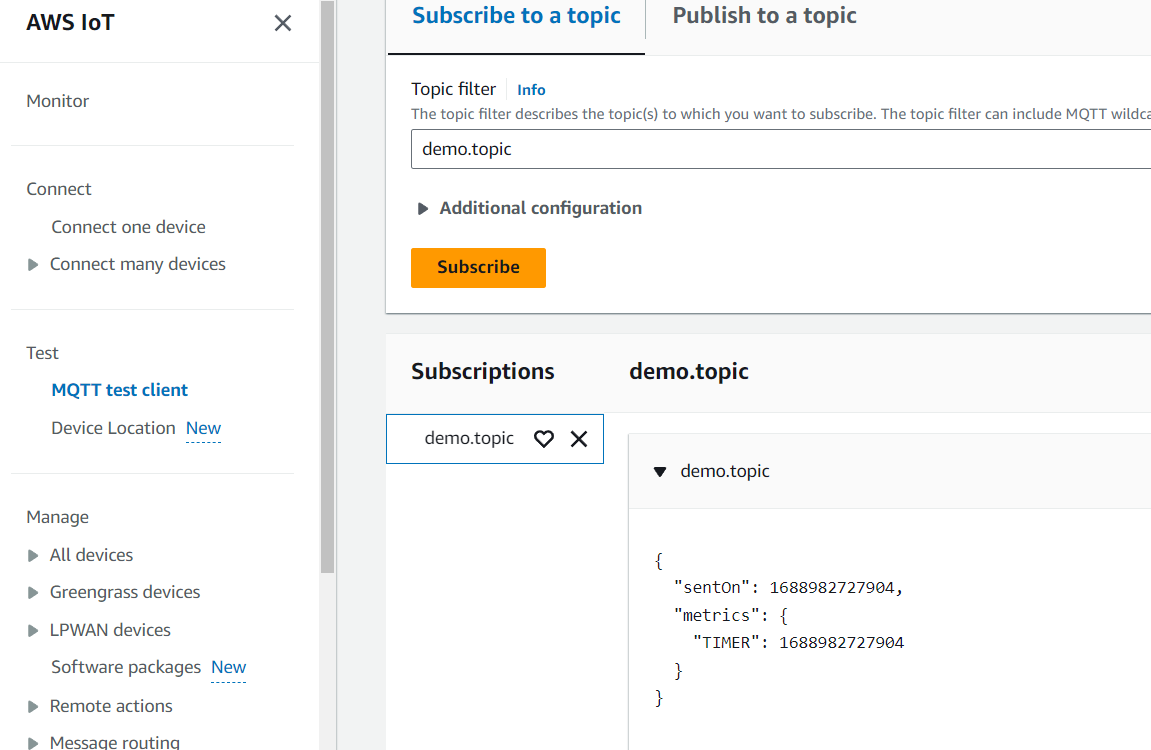
Debugging and Troubleshooting
The BoltGATE 20-25 default development configuration is meant to be ease access to the system and debugging.
- Ethernet Port 1 (9) is configured as DCHP Server with a IPv4 address of 172.16.0.1.
- Ethernet Port 2 (9) is configured as DHCP Client.
SSH protocol is enabled on standard port TCP 22 with, with guest user access. Password is the serial number of the unit, which you can find on the product label. To access the system, run:
You can use the eth_journalctl command to access the aggregated logs of the system:
Use these links for detailed information on log management and debugging.
Depending on the order code used for your Eurotech device, the system might already be set up for production environments. Refer to the ESF Security introduction to know more about framework execution modalities.
For any issue you might face when working with ESF, feel free to contact the awesome Eclipse Kura community. Chances are the issue you are facing has already been solved!
For detailed documentation, browse the ESF documentation.
If you need support for IoT Core, here it's a link to the FAQs.
And finally, should you need even more support, feel free to open a ticket on our ticketing system.